CELPIP Writing: How to Practice and Get AI Feedback
Updated 20 October 2026 · By the CELPIP TIP team
Short answer: To prepare for CELPIP Writing, practice both tasks under timed conditions, stay inside the 150–200 word guideline, score each response against the four official criteria — content, vocabulary, readability, and task fulfillment — and use AI feedback or a tutor to find the specific gap holding your score down. A focused two-week routine (below) is usually enough to lift one weak criterion before test day.
Key takeaways
- CELPIP Writing has 2 tasks — an email and a survey response — takes about 53 minutes, and is typed entirely on a computer.
- Both tasks share the same guideline: 150–200 words.
- Every response is scored on 4 criteria: content, vocabulary, readability, and task fulfillment.
- The most common avoidable score-killers are missed bullet points and wrong tone — both are task-fulfillment problems, not grammar problems.
- AI scoring tools give an estimated CLB band per criterion in seconds; they guide practice but don't replace the official test.
 Illustration (AI-generated)
What is CELPIP Writing?
CELPIP Writing is one of the four sections of the CELPIP-General test from Paragon Testing Enterprises, accepted by IRCC for Canadian Permanent Residency and citizenship. It has 2 tasks, takes about 53 minutes, and is scored on the CLB (Canadian Language Benchmark) scale, typically reported as a CELPIP level from M to 12.
The 2 CELPIP Writing tasks
Writing an Email
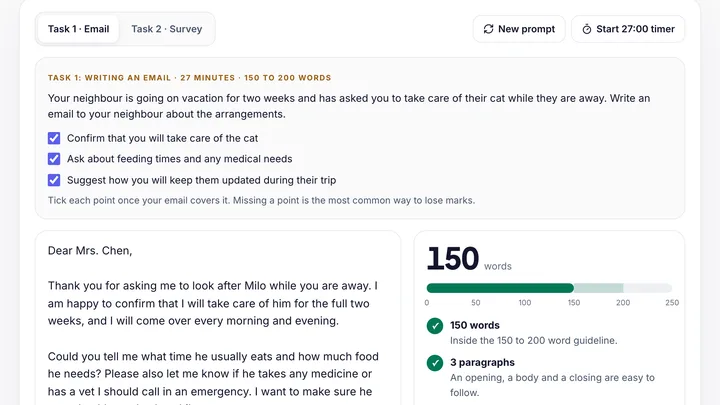
Task 1 – Writing an Email (about 27 minutes) — write an email responding to a situation (a complaint, a request, an invitation). The prompt lists points you must cover, and the scenario dictates the tone: formal for a stranger or company, semi-formal for a manager, friendly for a neighbour.
Responding to Survey Questions
Task 2 – Responding to Survey Questions (about 26 minutes) — choose one of two given options and justify your choice persuasively. It is an opinion paragraph set, not an email, so no greeting or sign-off.
Both tasks display a live word counter with a 150–200 word guideline. You can check the word count, paragraphs and greeting with our free CELPIP Writing checker.
How CELPIP Writing is scored — the 4 criteria
CELPIP raters assess every response on four dimensions:
Content / Coherence
Are your ideas relevant, developed, and logically organized?
Common reason for lost pointsAddressing only some of the bullet points in the prompt
Vocabulary
Range and precision of word choice
Common reason for lost pointsRepeating basic words ("good / bad / very") instead of precise ones
Readability
Grammar, spelling, punctuation, paragraphing — how easily it reads
Common reason for lost pointsRun-on sentences and unproofread typos
Task fulfillment
Did you do exactly what the task asked, in the right tone?
Common reason for lost pointsWrong register (casual email to a manager) or missing word count
The two most common reasons for a lower-than-expected score are missing a bullet point from the prompt and using the wrong tone — both task-fulfillment issues that grammar practice alone never fixes.
How to practice CELPIP Writing (a 2-week routine)
Planning and checking times follow the official CELPIP Writing Pro: Target 9+ Study Pack (2026).
- Step 1Write one timed task per day
Alternate Task 1 and Task 2. Use the real time limits — planning under the clock is part of the skill.
- Step 2Spend the first 4–5 minutes planning
List every bullet point in the prompt, decide the tone, sketch a 3–4 paragraph structure. Most task-fulfillment failures happen before the first sentence is typed.
- Step 3Self-score
Score each of the 4 criteria from 1–10 against the cards above. Be honest.
- Step 4Fix one criterion at a time.
Most people improve fastest by tightening task fulfillment (cover every point, match the tone) and upgrading vocabulary (swap "very good" for a precise word) first.
- Step 5Leave about 3 minutes to proofread.
The test has a basic spell check, but it can suggest the wrong word and grammar slips still cost readability points. Read it through yourself.
- Step 6Get objective feedback.
Self-scoring has a blind spot — you don't see your own gaps. A tutor or AI scoring tool that grades against the CLB rubric closes that gap fastest.
Can AI score CELPIP Writing accurately?
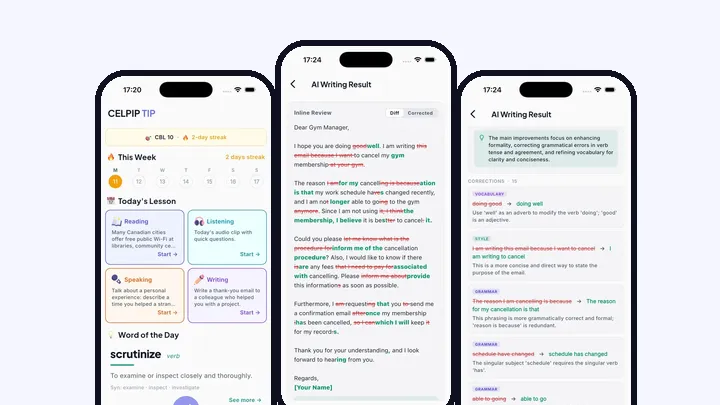
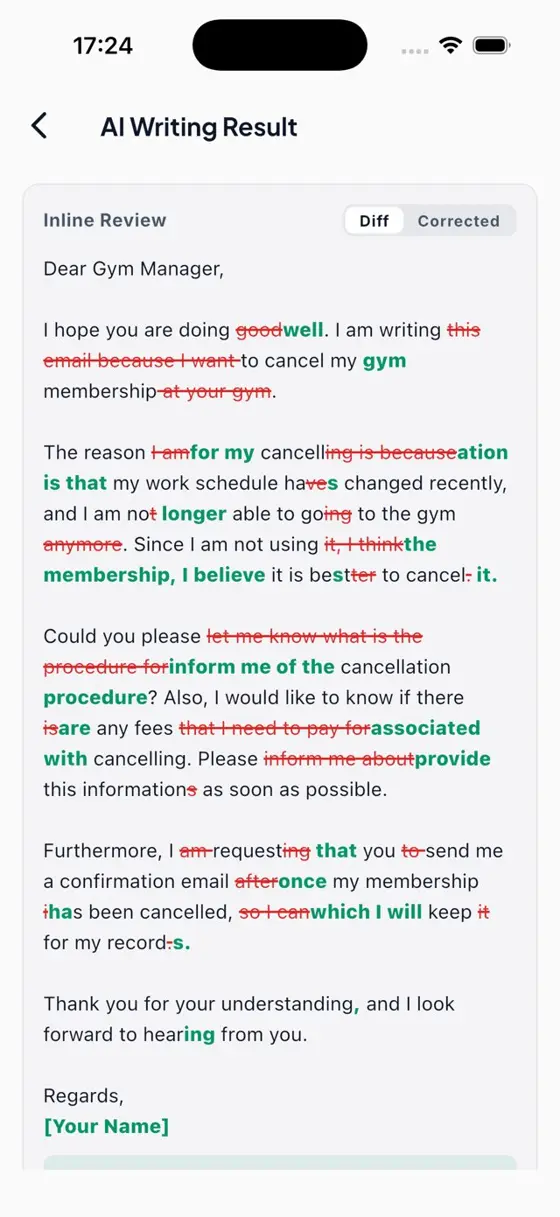
AI scoring tools evaluate your typed response against the same four criteria CELPIP raters use, returning an estimated CLB band and category-level feedback in seconds. They are not the official test, but they are useful for direction — knowing whether an answer is roughly a CLB 7 or a CLB 10, and which criterion is dragging you down — at a fraction of a tutor's cost. Several apps and websites now offer this, including CELPIP TIP with AI (instant AI scoring on Writing and Speaking, 1,600+ ratings since 2017), and others.
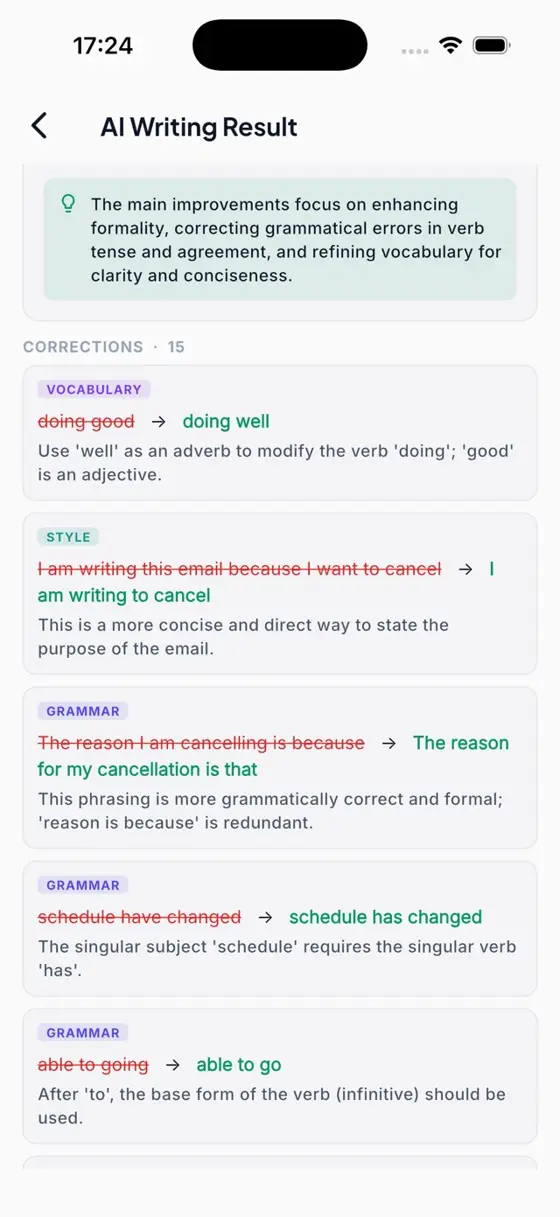
Corrections from a real AI Writing result
Use 'well' as an adverb to modify the verb 'doing'; 'good' is an adjective.
A more concise and direct way to state the purpose of the email.
The singular subject 'schedule' requires the singular verb 'has'.
After 'to', the base form of the verb (infinitive) should be used.
Frequently asked questions
How many CELPIP Writing tasks are there?
Two: Task 1 (Writing an Email, about 27 minutes) and Task 2 (Responding to Survey Questions, about 26 minutes) — roughly 53 minutes total, typed on a computer.
How many words should I write in CELPIP Writing?
The guideline for both tasks is 150–200 words. The on-screen word counter helps you stay in range; going far under typically hurts content, going far over costs editing time and invites errors.
Does spelling matter in CELPIP Writing?
Yes. Spelling and grammar feed the readability criterion. The test has a basic spell check, a word counter and editing tools (CELPIP-General Overview Study Pack 2026), but its suggestions can offer the wrong word, so leave a few minutes to proofread yourself.
Is AI feedback as accurate as an official CELPIP rater?
No tool replaces the official test, but AI scoring against the CLB rubric is a reliable guide for tracking progress and finding which of the four criteria is holding your band down.
Related: CELPIP Speaking: How to Practice & Get AI Feedback · Best CELPIP Prep Apps & Tools (2026) · CELPIP TIP home